Restaurant management software: features, costs and a practical checklist
Restaurant management software connects the jobs behind each service: taking orders, coordinating the kitchen, tracking stock and reviewing sales. The right system depends on how your team works, the devices you use and which tasks you need it to handle.
Start with a POS, a kitchen display, inventory and sales reports. Then check the full cost of your devices, software and payment setup. ServePoint combines those four functions in its $9.99 USD/month Pro plan with unlimited devices. See the product or review the plan.
Which features should restaurant management software include?
A feature list is only useful when it describes what happens during service. Use these everyday tasks to compare your options.
| Job | What to look for | What to test |
|---|---|---|
| Orders and checkout | Menu categories, item notes, discounts and bill management. | Enter a modified order, change a quantity and finish the bill. |
| Kitchen coordination | A kitchen display that receives orders from the floor. | Send an order from a second device and mark an item ready. |
| Inventory | Ingredient tracking and configurable low-stock alerts. | Make a sale and check the stock change against your recipe. |
| Reporting | Daily sales, popular items and exportable reports. | Find the day's revenue and export a report you can read. |
| Devices and printing | Support for your operating system and printer model. | Print an actual receipt using the hardware you will use at work. |
Explore the details in our kitchen display guide, inventory guide and sales reporting guide.
Restaurant management software vs. a POS system
A POS focuses on orders and checkout. Restaurant management software is a broader category that can also include inventory, reporting, staff scheduling, accounting or reservations. A POS with built-in kitchen and stock tools can cover much of an independent restaurant's daily service, but it does not automatically replace every back-office tool.
What does restaurant management software cost?
Compare the total cost for your actual setup, rather than the advertised starting price. Ask whether a quote is per location, per account or per device, and whether kitchen screens and reporting cost extra.
- Subscription: the monthly charge and any required add-ons.
- Hardware: phones, tablets, stands, printers and replacements.
- Payments: any separate card terminal, provider contract or processing charges.
- Setup: menu entry, staff training and transferring existing data.
- Connectivity: internet access for live synchronization between devices.
ServePoint Pro is $9.99 USD per month with unlimited devices. For example, a counter device, a waiter phone and a kitchen screen are covered by the same Pro plan. Hardware, connectivity and your separate payment arrangements should still be part of your budget. Check local store pricing and subscription terms before purchasing.
A five-step test before you switch
- Create a small sample menu. Add a few of your real items and prices.
- Run a complete order. Include a customer note, a quantity change and checkout.
- Connect the kitchen. Confirm that another device receives the correct items.
- Check the numbers. Compare the receipt, sales report and inventory change.
- Test your environment. Check printer compatibility and what happens when your connection drops. Live synchronization requires connectivity.
When is ServePoint a good fit?
ServePoint is designed for restaurants, cafés, bars and other food-service businesses that want orders, a kitchen display, inventory and reports in one app. It is available for Android, iPhone, iPad and Windows, with English, French, Spanish and Arabic language support.
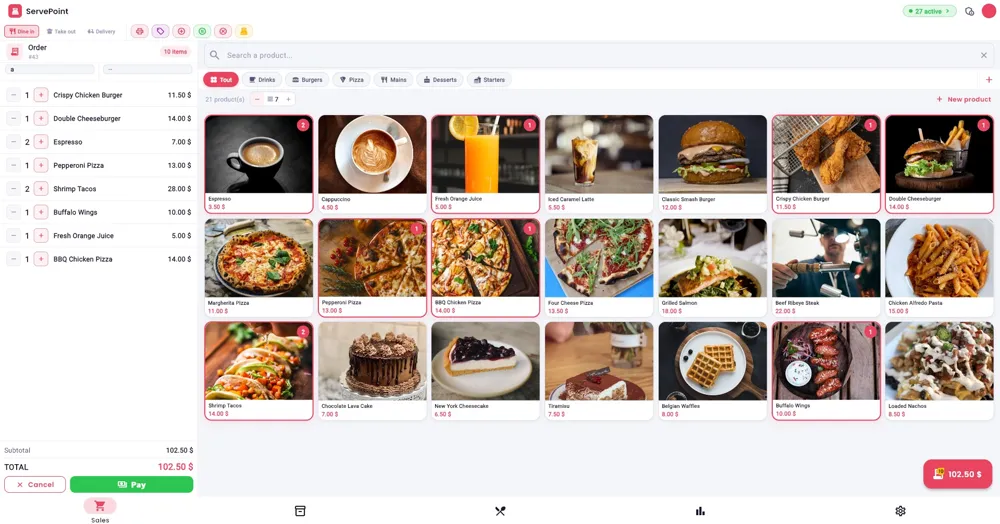
If you need payroll, a specific accounting integration, delivery-marketplace connections or a particular card terminal, ask us about your requirements before choosing. Check device and printer compatibility instead of assuming every setup is supported.
See how ServePoint fits your service
Explore the actual screens, review the $9.99/month Pro plan and choose the store for your device.
Get ServePoint ↗